Hyperparameter Tuning with Optuna in doubleml-pyspark
Overview
The doubleml-pyspark library provides integrated hyperparameter tuning using Optuna, a state-of-the-art hyperparameter optimization framework. This allows you to automatically find optimal hyperparameters for your machine learning models used in Double Machine Learning estimation.
Key features include flexible tuning (all models, some, or none), model-specific configuration with different settings for different learners, support for various evaluation metrics, access to full Optuna study objects and tuning history, and seamless integration with PySpark ML estimators.
1. Quick Start
Here is a minimal example to get you started. Please note that these are illustrative examples only; you should adjust the parameter spaces and model choices to fit your specific dataset and requirements.
import optuna
from pyspark.ml.classification import LogisticRegression
from pyspark.ml.regression import LinearRegression
from doubleml_pyspark.irm import DoubleMLIRM
from doubleml_pyspark.utils import kfold_split

# Define parameter spaces
def logreg_params(trial):
    return {
        "maxIter": trial.suggest_int("maxIter", 50, 200),
        "regParam": trial.suggest_float("regParam", 1e-6, 1.0, log=True),
    }

def linreg_params(trial):
    return {
        "maxIter": trial.suggest_int("maxIter", 50, 200),
        "regParam": trial.suggest_float("regParam", 1e-6, 1.0, log=True),
    }

# Initialize estimator
dml = DoubleMLIRM(data_schema, data_field_map)

# Cross-fitting folds: one list of (train, test) pairs per repetition
kfold_splits = kfold_split(df, n_folds=3, n_rep=1, shuffle=True, seed=42)

# Define models
ml_models = {
    "ml_m": LogisticRegression(),
    "ml_g0": LinearRegression(),
    "ml_g1": LinearRegression(),
}

# Define parameter spaces
ml_param_space = {
    "ml_m": logreg_params,
    "ml_g0": linreg_params,
    "ml_g1": linreg_params,
}

# Tune hyperparameters
best_models = dml.tune_ml_models(
    spark_session=spark,
    data_split=kfold_splits[0][0],
    ml_models=ml_models,
    ml_param_space=ml_param_space,
    optuna_settings={"n_trials": 10}
)

# Fit with best models
dml.fit(spark, kfold_splits[0], best_models)
2. Core Concepts
The main entry point for hyperparameter tuning is the tune_ml_models method. It evaluates each candidate using the single (train, test) pair provided in data_split, creates Optuna studies for each model in ml_param_space (e.g., ml_m, ml_g0), and runs n_trials to find parameters that optimize the score (e.g., minimize RMSE or maximize AUC) on that split. It returns the model configuration that performed best during the trials.
def tune_ml_models(
    self,
    spark_session: SparkSession,
    data_split: tuple[DataFrame, DataFrame],
    ml_models: dict[str, Any],
    ml_param_space: dict[str, Callable | None],
    scoring_methods: dict | None = None,
    num_partitions: int | None = None,
    return_tune_res: bool = False,
    optuna_settings: dict | None = None,
) -> dict[str, Any] | tuple[dict[str, Any], dict[str, DMLOptunaResult]]
Parameters:
- spark_session: Active Spark session
- data_split: A single (train, test) DataFrame tuple
- ml_models: Dictionary mapping model names to Spark ML estimators
- ml_param_space: Dictionary mapping model names to parameter space functions
- scoring_methods: (Optional) Dictionary of scoring metrics for each model
- num_partitions: (Optional) Number of Spark partitions
- return_tune_res: If True, returns both models and detailed results
- optuna_settings: (Optional) Optuna configuration settings
Returns:
- If return_tune_res=False: Dictionary of best models
- If return_tune_res=True: Tuple of (best_models, tuning_results)
The expected model names depend on the estimator type. For DoubleMLIRM (Interactive Regression Model): ml_m is the propensity classifier (treatment), ml_g0 is the outcome regressor for the control group, and ml_g1 is the outcome regressor for the treatment group. For DoubleMLPLR (Partially Linear Regression): ml_m is the treatment model (regressor or classifier) and ml_l is the outcome regressor.
# DoubleMLIRM
from pyspark.ml.classification import LogisticRegression
from pyspark.ml.regression import LinearRegression

ml_models = {
    "ml_m": LogisticRegression(),    # Propensity model (treatment, binary -> classifier)
    "ml_g0": LinearRegression(),     # Outcome model for control group
    "ml_g1": LinearRegression(),     # Outcome model for treatment group
}

# DoubleMLPLR
from pyspark.ml.regression import LinearRegression

ml_models = {
    "ml_m": LinearRegression(),      # Treatment model (LinearRegression if continuous;
                                     # use LogisticRegression() if treatment is binary)
    "ml_l": LinearRegression(),      # Outcome model
}
3. Parameter Space Definition
Parameter spaces are defined as callable functions. They allow you to describe the range of values (search space) that Optuna should explore for each hyperparameter using the trial object.
def my_param_space(trial):
    return {
        "maxIter": trial.suggest_int("maxIter", 50, 200),
        "regParam": trial.suggest_float("regParam", 1e-6, 1.0, log=True),
        "elasticNetParam": trial.suggest_float("elasticNetParam", 0.0, 1.0),
    }
The trial object provides methods to define the search space for different hyperparameter types, including suggest_int for integers, suggest_float for continuous values, and suggest_categorical for discrete options.
# Integer parameters
trial.suggest_int("maxDepth", 3, 10)

# Float parameters
trial.suggest_float("learningRate", 0.001, 0.1, log=True)

# Categorical parameters
trial.suggest_categorical("optimizer", ["adam", "sgd", "rmsprop"])
The following functions define hyperparameter search spaces for common model types by instructing Optuna to explore specific ranges for iterations, regularization strength, and mixing ratios, as well as boolean options for standardization and intercept fitting. Depending on your use case you should adopt the grids.
# Logistic Regression
def logreg_param_space(trial):
    return {
        "maxIter": trial.suggest_int("maxIter", 50, 200),
        "regParam": trial.suggest_float("regParam", 1e-6, 1.0, log=True),
        "elasticNetParam": trial.suggest_float("elasticNetParam", 0.0, 1.0),
        "standardization": trial.suggest_categorical("standardization", [True, False]),
        "fitIntercept": trial.suggest_categorical("fitIntercept", [True, False]),
    }

# Penalized Linear Regression
def linreg_param_space(trial):
    return {
        "maxIter": trial.suggest_int("maxIter", 50, 200),
        "regParam": trial.suggest_float("regParam", 1e-4, 1.0, log=True),
        "elasticNetParam": trial.suggest_float("elasticNetParam", 0.0, 1.0),
        "standardization": trial.suggest_categorical("standardization", [True, False]),
        "fitIntercept": trial.suggest_categorical("fitIntercept", [True, False]),
    }

# Random Forest Regressor
def rf_param_space(trial):
    return {
        "numTrees": trial.suggest_int("numTrees", 10, 100),
        "maxDepth": trial.suggest_int("maxDepth", 3, 15),
        "minInstancesPerNode": trial.suggest_int("minInstancesPerNode", 1, 10),
        "subsamplingRate": trial.suggest_float("subsamplingRate", 0.5, 1.0),
    }

# GBT Regressor
def gbt_param_space(trial):
    return {
        "maxDepth": trial.suggest_int("maxDepth", 3, 10),
        "maxIter": trial.suggest_int("maxIter", 50, 200),
        "stepSize": trial.suggest_float("stepSize", 0.01, 0.3),
        "subsamplingRate": trial.suggest_float("subsamplingRate", 0.5, 1.0),
    }
4. Optuna Settings
You can control the optimization behavior using a configuration dictionary. This allows you to set global defaults (like number of trials) and override them for specific models if needed. These parameters serve as the defaults for every model in the DoubleML estimator, effectively setting the standard rules that will apply unless you provide a specific override for a particular learner.
optuna_settings = {
    "n_trials": 10,                      # Number of trials per model
    "direction": "minimize",              # Or "maximize"
    "n_jobs_optuna": 1,                  # Parallel jobs (-1 for all cores)
    "gc_after_trial": True,              # Garbage collection after each trial
    "verbosity": optuna.logging.WARNING, # Logging level
    "timeout": None,                      # Time limit in seconds
}
| Setting | Type | Description | Default |
|---|---|---|---|
n_trials |
int | Number of optimization trials | 5 |
direction |
str | "minimize" or "maximize" | "minimize" |
n_jobs_optuna |
int | Number of parallel jobs | 1 |
gc_after_trial |
bool | Run garbage collection after trials | True |
verbosity |
int | Optuna logging verbosity | WARNING |
timeout |
int|None | Maximum time in seconds | None |
sampler |
Sampler|None | Optuna sampler instance | None |
pruner |
Pruner|None | Optuna pruner instance | None |
callbacks |
list|None | List of callback functions | None |
study_kwargs |
dict | Additional study creation kwargs | {} |
optimize_kwargs |
dict | Additional optimize kwargs | {} |
show_progress_bar |
bool | Display Optuna progress bar during optimization | False |
You can override the global settings for specific models:
optuna_settings = {
    # Global settings
    "n_trials": 10,
    "direction": "minimize",
    "gc_after_trial": False,

    # Model-specific overrides
    "ml_m": {
        "n_trials": 20,           # More trials for propensity model
        "direction": "maximize",   # Maximize AUC for classifier
    },
    "ml_g0": {
        "n_trials": 15,
    },
    "ml_g1": {
        "n_trials": 15,
    },
}
5. Scoring Methods
Important: Always ensure your Optuna direction (minimize/maximize) aligns with your chosen scoring method. For example, if you choose "areaUnderROC" (where higher is better), you must set direction="maximize".
If not specified, the library uses "rmse" (Root Mean Squared Error) for regressors and "logLoss" (Log Loss) for classifiers.
Available metrics for regressors: "rmse" (lower is better), "mse" (lower is better), "mae" (lower is better), "r2" (higher is better). Available metrics for binary classifiers: "logLoss" (lower is better), "areaUnderROC" (higher is better), "areaUnderPR" (higher is better), "f1" (higher is better), "accuracy" (higher is better).
scoring_methods = {
    "ml_m": "areaUnderROC",    # AUC for propensity model
    "ml_g0": "mae",            # MAE for outcome model
    "ml_g1": "r2",             # R² for outcome model
}

best_models = dml.tune_ml_models(
    spark_session=spark,
    data_split=kfold_splits[0][0],
    ml_models=ml_models,
    ml_param_space=ml_param_space,
    scoring_methods=scoring_methods,
    optuna_settings={"n_trials": 10}
)
Ensure your Optuna direction matches your scoring metric:
# For metrics where LOWER is better (RMSE, MAE, logLoss)
optuna_settings = {
    "direction": "minimize",
    # Or model-specific:
    "ml_g0": {"direction": "minimize"},
}

# For metrics where HIGHER is better (R², AUC, accuracy)
optuna_settings = {
    "direction": "maximize",
    # Or model-specific:
    "ml_m": {"direction": "maximize"},
}
6. Tuning Modes
You control which models get tuned through ml_param_space. To tune all models, include a callable for each. To tune only a subset, include callables only for those models — others will use default parameters. To skip tuning entirely, pass an empty dictionary {} which returns ml_models unchanged. To explicitly skip specific models, set their value to None.
| Mode | ml_param_space |
Behavior |
|---|---|---|
| Full tuning | {"ml_m": logreg_params, "ml_g0": linreg_params, "ml_g1": linreg_params} |
All models are tuned |
| Partial tuning | {"ml_g0": linreg_params, "ml_g1": linreg_params} |
Only included models are tuned; others use defaults |
| No tuning | {} |
Returns ml_models unchanged |
| Explicit skip | {"ml_m": None, "ml_g0": linreg_params, "ml_g1": linreg_params} |
None entries are skipped; others are tuned |
7. Inspecting Winning Hyperparameters
After tuning, pass return_tune_res=True to access the selected parameters:
best_models, results = dml.tune_ml_models(
    spark_session=spark,
    data_split=kfold_splits[0][0],
    ml_models=ml_models,
    ml_param_space=ml_param_space,
    optuna_settings={"n_trials": 20},
    return_tune_res=True,
)

for name, res in results.items():
    if res.tuned:
        print(f"{name}: score={res.best_score:.4f}, params={res.best_params}")
You can also read parameters back directly from the returned estimator:
For a trial-by-trial view, convert the Optuna study to a DataFrame:
df = results["ml_m"].study.trials_dataframe(attrs=("number", "value", "params", "state"))
print(df.sort_values("value").head())
8. Comparison
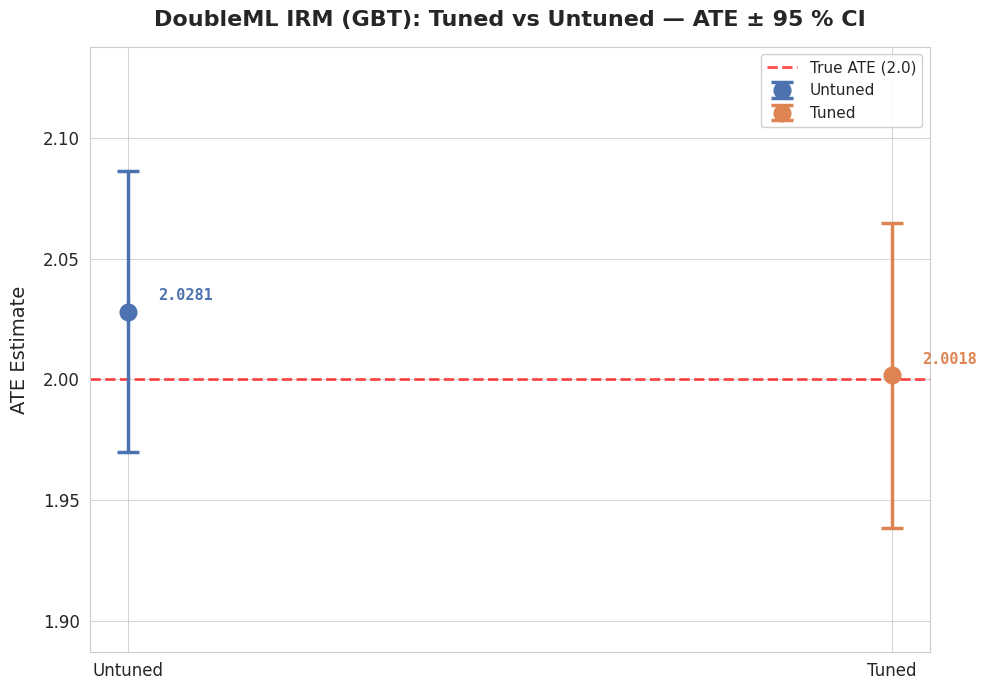
The plot below shows the ATE point estimates with 95% confidence intervals for the untuned and tuned GBT pipelines. The untuned baseline uses deliberately weak hyperparameters (maxIter=5, maxDepth=2, stepSize=0.5), while the tuned pipeline uses Optuna-optimized parameters. Both estimates recover the true ATE of 2.0, but tuning substantially improves precision — the tuned CI is roughly half the width of the untuned one, reflecting better nuisance model performance.
import matplotlib.pyplot as plt
import matplotlib.font_manager as fm
import seaborn as sns

os.makedirs("figures", exist_ok=True)

plt.rcParams.update({
    "font.family": "serif",
    "font.serif": ["Georgia", "Times New Roman", "DejaVu Serif"],
    "mathtext.fontset": "stix",
    "axes.titleweight": "bold",
    "axes.labelweight": "medium",
})

sns.set_style("whitegrid")
PALETTE = {"Untuned": "#4C72B0", "Tuned": "#DD8452"}
TRUE_ATE = 2.0

fig, ax = plt.subplots(figsize=(10, 7))

for i, row in df_compare.iterrows():
    c = PALETTE[row["Pipeline"]]
    yerr = [[row["ATE"] - row["ci_lower"]], [row["ci_upper"] - row["ATE"]]]
    ax.errorbar(
        i, row["ATE"], yerr=yerr,
        fmt="o", markersize=12, capsize=8, capthick=2.5,
        elinewidth=2.5, color=c, label=row["Pipeline"], zorder=3,
    )
    ax.annotate(
        f'{row["ATE"]:.4f}',
        (i, row["ATE"]), textcoords="offset points",
        xytext=(22, 8), fontsize=11, color=c, fontweight="bold",
        fontfamily="monospace",
    )

ax.axhline(TRUE_ATE, color="red", ls="--", lw=2, alpha=0.7,
           label=f"True ATE ({TRUE_ATE})", zorder=1)

ci_lo = df_compare["ci_lower"].min()
ci_hi = df_compare["ci_upper"].max()
y_margin = (ci_hi - ci_lo) * 0.35
ax.set_ylim(ci_lo - y_margin, ci_hi + y_margin)

ax.set_xticks(range(len(df_compare)))
ax.set_xticklabels(df_compare["Pipeline"], fontsize=14, fontweight="medium")
ax.set_ylabel("ATE Estimate", fontsize=14, labelpad=10)
ax.set_title(
    "DoubleML IRM (GBT): Tuned vs Untuned — ATE ± 95 % CI",
    fontsize=16, fontweight="bold", pad=15,
)
ax.legend(fontsize=11, loc="upper right", framealpha=0.9)
ax.tick_params(axis="both", labelsize=12)

plt.tight_layout()
plt.savefig("figures/tuned_vs_untuned_comparison.png", dpi=200, bbox_inches="tight")
plt.show()
9. Visualization of the Study
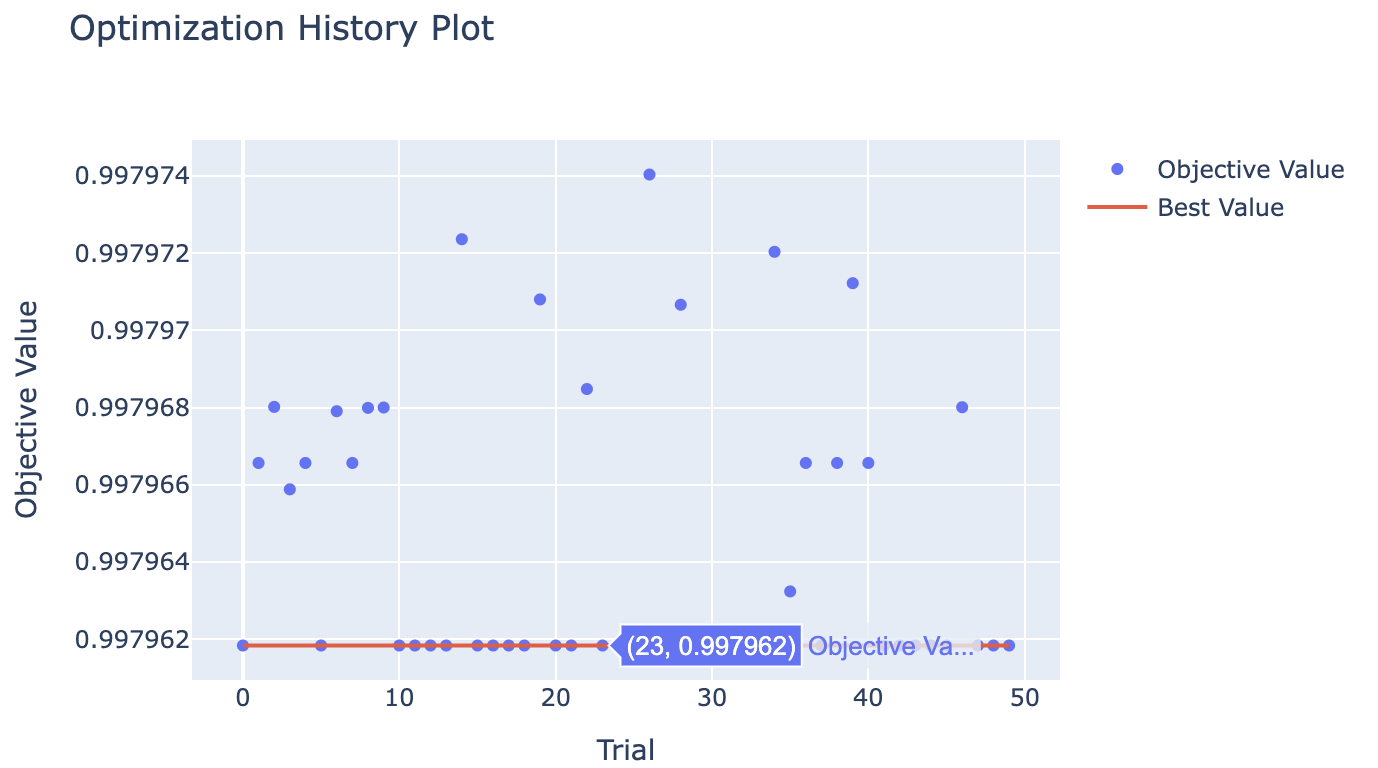
Shows the objective score at each Optuna trial. The blue dots are individual trials; the red line tracks the best score found so far. A flattening curve means tuning has converged.
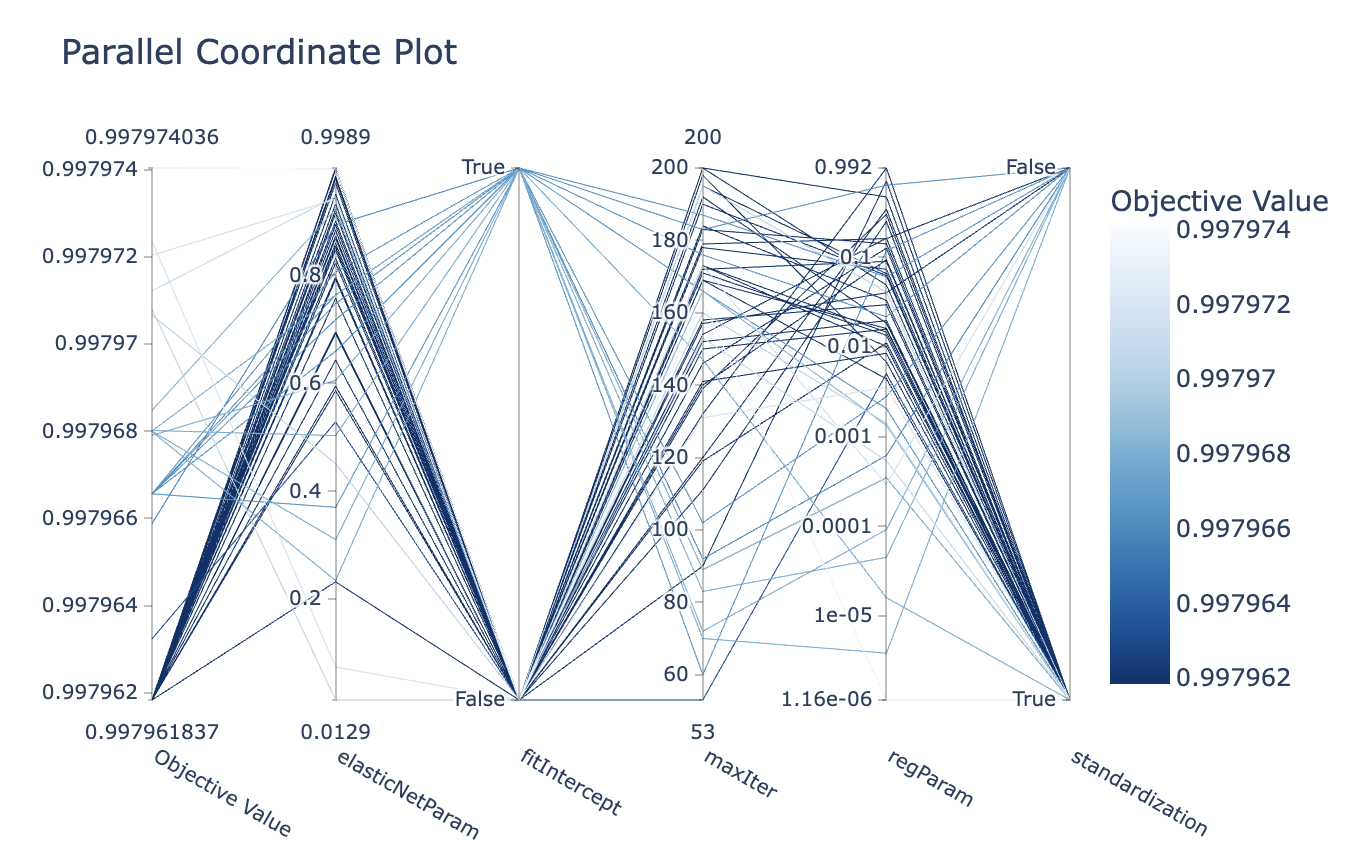
Each vertical axis is a hyperparameter, and each line is one trial colored by its score. Traces that cluster in the same region across axes reveal which parameter combinations consistently perform well.
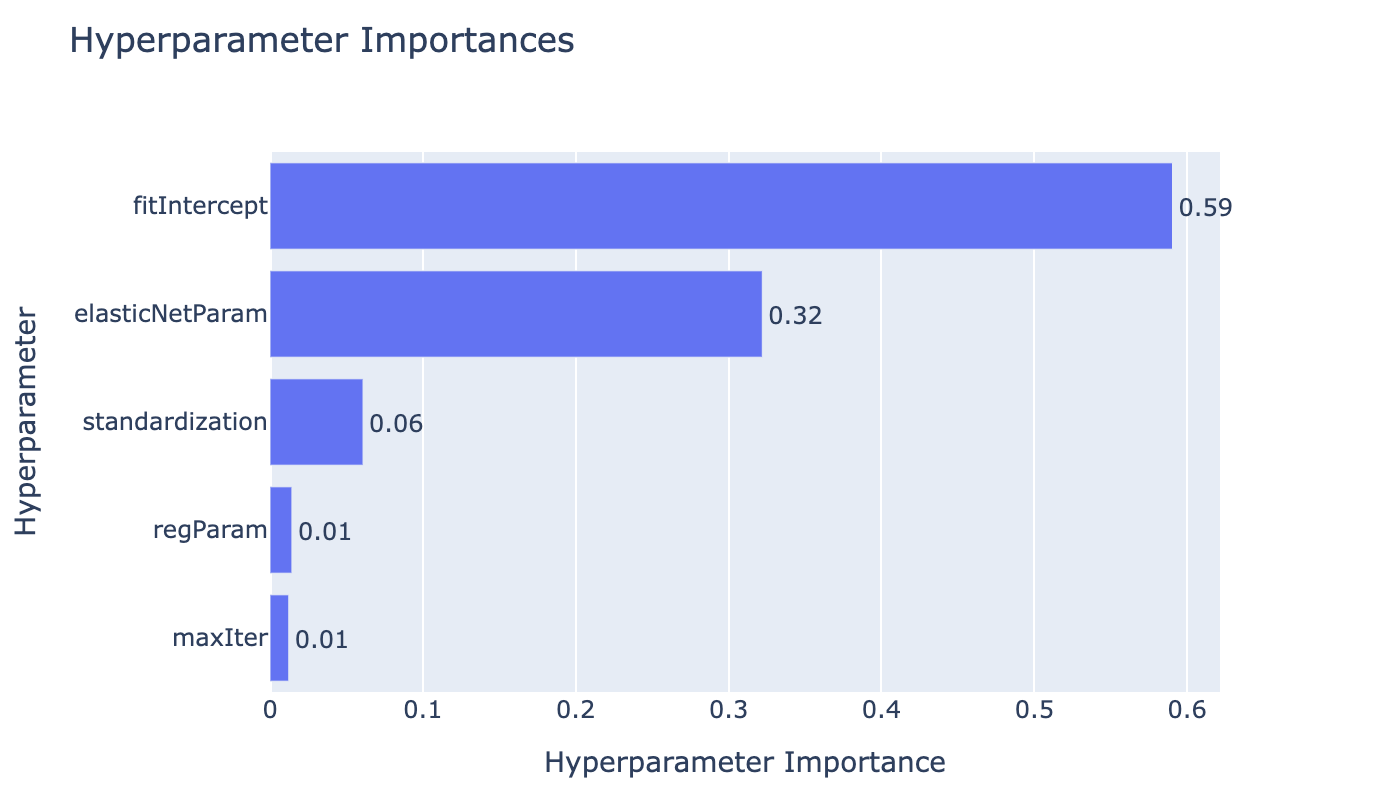
Ranks hyperparameters by how much their variation explains the difference in objective scores across trials. Parameters with low importance can be fixed to their default in future runs to speed up tuning.
10. Best Practices
For the number of trials, use 5–10 for quick exploration, 20–50 for standard work, and 100+ for thorough searches. Start small and increase if needed; monitor convergence in study objects.
For parameter space design, use log=True for regularization parameters, set reasonable bounds based on domain knowledge (avoid excessively wide ranges), and limit the number of parameters to keep search complexity manageable.
For reproducibility and memory management:
from optuna.samplers import TPESampler

optuna_settings = {
    "n_trials": 50,
    "sampler": TPESampler(seed=42),  # Reproducible results
    "gc_after_trial": True,          # Prevents memory leaks
}
For small datasets (< 1,000 obs), reduce n_trials (e.g., 5) to avoid overfitting to CV splits, use simpler parameter spaces or consider default parameters, and ensure at least ~100 observations per validation fold.
11. DMLOptunaResult Object
If you need to analyze the optimization history or debug the tuning process, setting return_tune_res=True will return a detailed result object. This includes the full Optuna Study instance, allowing you to inspect every trial run.
best_models, results = dml.tune_ml_models(
    spark_session=spark,
    data_split=kfold_splits[0][0],
    ml_models=ml_models,
    ml_param_space=ml_param_space,
    return_tune_res=True,
)

# Access result attributes
for model_name, result in results.items():
    print(f"\n{model_name}:")
    print(f"  learner_name: {result.learner_name}")
    print(f"  tuned: {result.tuned}")
    print(f"  best_estimator: {result.best_estimator}")
    print(f"  best_params: {result.best_params}")
    print(f"  best_score: {result.best_score}")
    print(f"  scoring_method: {result.scoring_method}")

    # Access full study object
    if result.study is not None:
        print(f"  n_trials: {len(result.study.trials)}")
        print(f"  best_trial: {result.study.best_trial.number}")

        # Optuna study methods available
        # result.study.trials_dataframe()
        # optuna.visualization.plot_optimization_history(result.study)
The attributes are: learner_name (name of the model, e.g. "ml_m", "ml_g0"), best_estimator (fitted estimator with best parameters), tuned (boolean indicating if tuning was performed), best_params (dictionary of best hyperparameters), best_score (best cross-validation score achieved), study (full Optuna Study object, None if not tuned), and scoring_method (scoring metric used for evaluation).
12. Summary
The Optuna integration in doubleml-pyspark provides flexible tuning (full, partial, or no tuning modes), rich configuration (global and model-specific settings), support for various scoring methods, access to full Optuna study objects, and seamless integration with standard PySpark ML models.
Key takeaways: define parameter spaces as callable functions, use appropriate scoring methods and directions, start with fewer trials and increase as needed, leverage model-specific settings for fine-grained control, always inspect results with return_tune_res=True during development, and follow best practices for reproducibility and performance.
For more information: - Optuna Documentation - PySpark ML Guide - DoubleML Methodology